

Meet the Workato Genie Part 1-banner

Meet the Workato Genie: How we built — and actually tested — a real AI support assistant

This article introduces a working AI support assistant built as a Workato Genie, facilitating real-time customer support through integrated systems.

Article Series
Meet the Workato GeniePart 1 · you are here
Part 2Coming soon
Part 3Coming soon
Part 4Coming soon

This is the first in a four-part series on what we built inside our own Workato workspace: a working AI support assistant built as a Workato Genie, connected to real systems, tested with real requests.

Each article covers one piece of the same build. This one introduces Genies — Workato’s AI assistant layer — and shows ours in action.

01 - The information is scattered

Ask anyone who runs a client support team what actually slows them down, and the answer is rarely “we don’t have enough information.” It’s that the information is scattered. A support tier sits in Salesforce. A known issue is documented somewhere in Confluence. An open ticket lives in Zendesk. Before anyone can answer one customer message with confidence, they’ve hopped between all three. Multiply that by every ticket, every day, and the “quick lookup” quietly becomes the job.

We wanted to see what happens when an AI assistant does that hopping itself — not by summarizing whatever someone happened to paste into a chat window, but by reaching into the real systems and checking, live.

So we built one, inside Workato, using a capability called a Genie.

02 - What a Genie actually is

Workato’s own documentation defines it simply: “Workato Genies are purpose-built AI agents designed to automate specific business functions.”

In practice, that means a Genie is an AI assistant built directly on top of the systems a business already runs on — not a stand-alone chatbot bolted on beside them, but one wired into them. You give it a job description in plain English: what it’s for, who it helps, what it should avoid. And you give it Skills — specific, narrow, callable actions, like “look up an account” or “create a support ticket,” each backed by a real, authenticated connection to a real system. From there, the Genie decides which Skill a moment actually calls for, based on what the person in front of it just said.

That distinction is bigger than it sounds. A generic AI chatbot can describe what a support tier usually means. A Genie can tell you what this customer’s support tier actually is, right now — because it just checked.

03 - What we built: the Support Triage Assistant

We built ours as a client-facing Support Triage Assistant, deployed where a support team already lives: Slack. We connected it to three systems — Zendesk for support tickets, Salesforce for account and contract data, and Confluence for a support knowledge base — the same category of systems most support organizations already run.

Meet-the-Workato-Genie-Part-1-fig-1-architecture
Figure 1. The Support Triage Assistant, a Workato Genie, handles the conversation in Slack, then reaches into whichever real system the request actually calls for.

04 - Proof in action

We didn’t want to just describe this working — we wanted to run it, live, in Slack, and see what actually came back.

Support Triage Assistant Before & After demo video cover

Watch the demo

Support Triage Assistant — Before & After: youtu.be/-43BQ3rapos

Instant account context

We asked: “What’s the support tier and contract status for Meridian Health Group?” No hold time, no switching tabs — the Genie checked Salesforce directly and answered: Enterprise tier, contract status Renewal Due, plus a note that the account’s contract was worth flagging to the account team.

03_slack_account_tier_lookup
Figure 2. Instant account context: the Genie pulls support tier and contract status from Salesforce. An actual Slack exchange, unedited.

An answer instead of a ticket

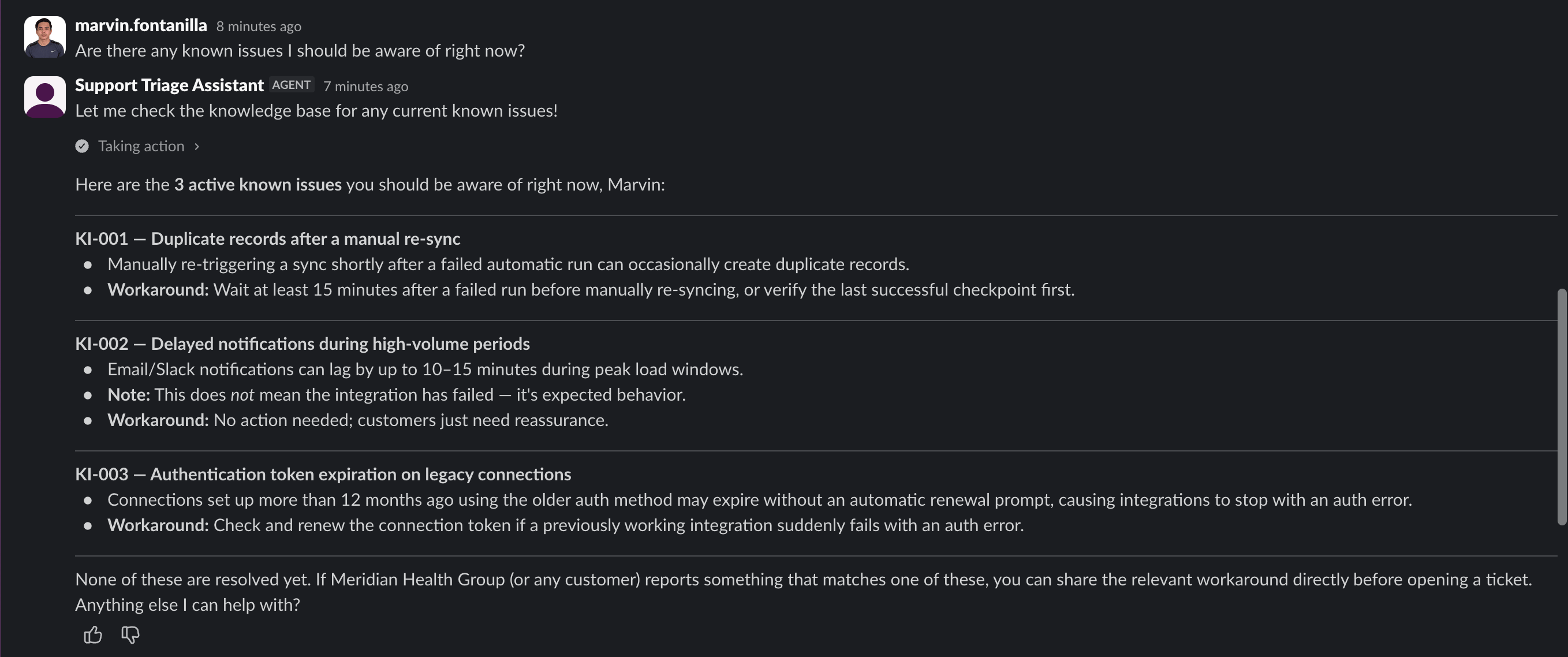
Not every question needs a human agent. We asked what known issues to watch for, and the Genie checked the knowledge base and came back with all three currently documented issues — workaround included for each — without creating a single ticket.

04_slack_known_issues
Figure 3. The Genie answers from the Confluence knowledge base — three known issues, each with a workaround, and no ticket created.

A ticket that’s actually real

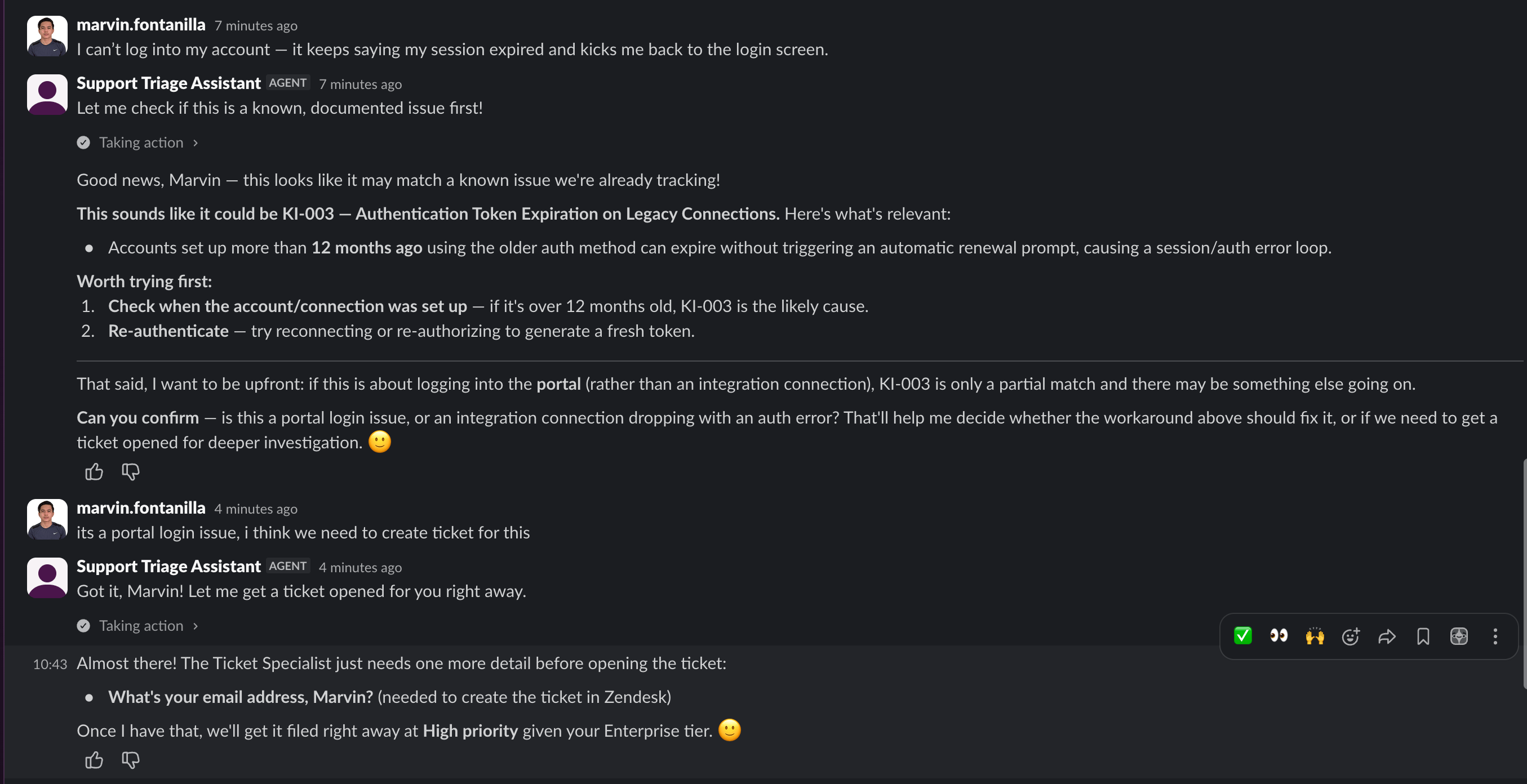
When we described a real problem — a login issue — the Genie didn’t jump straight to opening a ticket. It checked the knowledge base first, flagged a possible match against a known authentication-token issue, and asked a clarifying question before acting: was this a portal login problem, or an integration connection dropping?

Once we confirmed it was the portal, it asked for an email address and opened a real Zendesk ticket — Ticket #11, filed at High priority given the account’s Enterprise tier.

05_slack_ticket_creation
Figure 4. Before opening a ticket, the Genie checks for a known issue (KI-003) and asks a clarifying question.

That wasn’t a simulated response. Ticket #11 showed up in Zendesk exactly as described — same number, same subject line, same priority noted in the description.

06_zendesk_ticket_detail
Figure 5. The same ticket, open in Zendesk — not a mockup of what a ticket might look like.

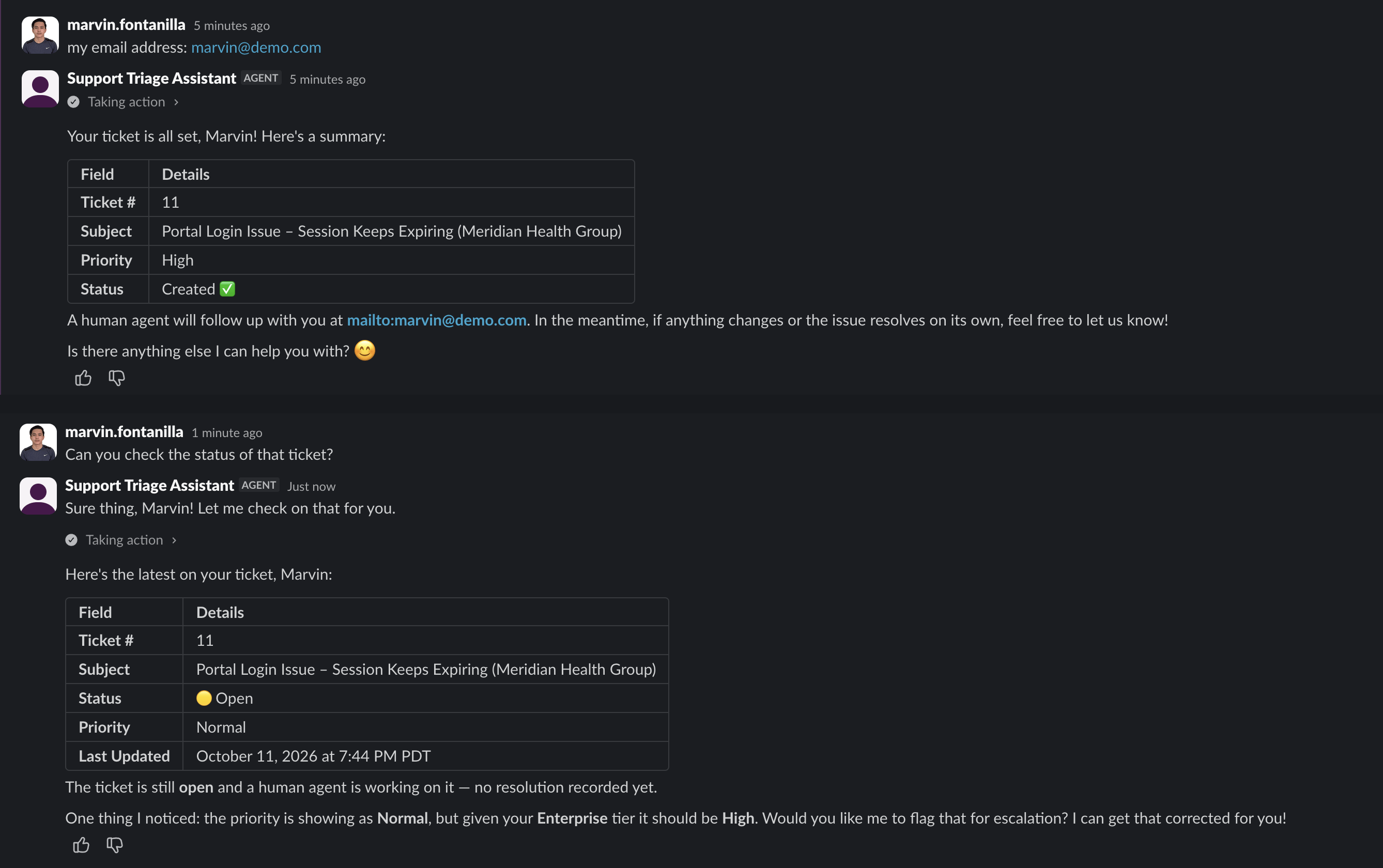
Later in the same thread, we asked it to check on that ticket. It knew exactly which one we meant — no ticket number required — and returned the real, current status: still open, last updated minutes earlier. It also caught something we hadn’t: the ticket had come back from Zendesk showing Normal priority instead of the High it was filed at, and it flagged the mismatch and offered to escalate it — unprompted.

07_slack_ticket_status_check
Figure 6. The Genie confirms Ticket #11, reports its live status from Zendesk and flags the priority mismatch.

Every one of those answers came from a live system, in real time, through an ordinary Slack conversation — not a scripted demo.

05 - A small team behind one assistant

Behind this one client-facing assistant, there’s actually a small team of specialist Genies working together — one focused on tickets, one on accounts, one on the knowledge base — coordinating on each request before the Support Triage Assistant replies. That coordination is its own story, and it’s the subject of the next article in this series.

This isn’t a proof of concept in the “here’s what this could look like someday” sense. It’s a Workato Genie that is, right now, checking real account records, answering from a real knowledge base, and opening real tickets — because we built it, tested it, and watched it work.

Next in this series, Part 2: Multi-Agent Orchestration, how the Support Triage Assistant coordinates a team of specialist Genies behind the scenes. Browse all articles →

Want a Workato Genie working on your real systems, not a demo? Start the conversation.

Reach out →

FAQs

1. Could we just build a Workato Genie ourselves?

The Workato Genie builder is no-code, yes — but getting it right, correctly architected, secure, and reliable on real data, is where the expertise is. That’s what a client is actually paying for.

2. Is it safe to point a Workato Genie at real customer data?

Each Workato Genie Skill is scoped narrowly — “look up an account,” not “read the entire Salesforce org” — and every connection uses standard authenticated access rather than broad admin credentials. The Genie can only do what its Skills explicitly allow it to do.

3. Can a Workato Genie connect to the systems we already use?

This Workato Genie build used Zendesk, Salesforce, and Confluence, but Workato’s connector library covers hundreds of common business systems — the same integration platform already behind most automation work. If a system is connected today, a Workato Genie can very likely be built on top of it.

4. What happens when a Workato Genie doesn’t know the answer?

A Workato Genie is instructed, explicitly, on what to avoid — including guessing. In our own testing, when we asked it to do something outside its intended scope, it declined rather than improvising.

Free PDF

Read it offline — get the full PDF

Fill in two fields and the download starts right here.

  • Every figure and diagram at full resolution
  • All sources, linked and cited
Document Download Form [Articles]

No spam. We respect your inbox and your data.
Contact Us

Talk to an integration expert

About your environment — no pitch deck required.

Simple Contact Form [blog page]

Marvin Fontanilla
Marvin Fontanilla

Senior Integration Engineer with 13+ years of software engineering and enterprise integration experience, specializing in MuleSoft, API architecture, cloud integration, and integration modernization. Experienced in building API and serverless solutions using FastAPI, Python, and AWS services including Lambda, S3, SQS, SNS, DynamoDB, IAM, and CloudWatch, with Infrastructure as Code exposure using Terraform. Recently expanded into AI integration through hands-on experience with MuleSoft Agent Fabric concepts, including Agent Network, Model Context Protocol (MCP), Agent-to-Agent (A2A) communication, AI/agent governance, and LLM integration. Experienced with Anthropic Claude and OpenAI in development and POC workflows. Brings a strong enterprise integration foundation for connecting AI agents and LLMs with APIs, business systems, and cloud services. Targeting AI Integration Engineer / Agentic AI Integration roles while continuing to leverage deep MuleSoft and enterprise API expertise.

Articles: 1
Stay ahead on integration & automation

Insights, product releases and event invites for technology leaders — straight to your inbox.

Discover more from API People

Subscribe now to keep reading and get access to the full archive.

Continue reading