
 Workato
 Azure
Azure MuleSoft
 Salesforce
 AWS
AWS


The Salesforce Hosted MCP Server is a set of query and schema tools that Salesforce builds and maintains. This build points a Workato Genie at that server and puts it in Slack, so people can ask plain-English questions about their CRM data without anyone writing or maintaining a custom integration.
The tools come from Salesforce. Workato decides which of them the Genie may use, in what order, and on whose behalf.
An AI agent’s limits are set by the server and tool list it is given, not by what its prompt promises.
Why Skip the Middleware Layer with Salesforce Hosted MCP
This proof of concept lets people ask plain-English questions about Salesforce data from Slack, without writing SOQL and without anyone building or maintaining a translation layer.
Most “ask your CRM” bots solve the same problem the same way. Someone builds a custom API or bot that turns “show me my recent opportunities” into the right query. That layer has to be maintained every time the schema changes underneath it, and it usually ends up depending on the one person who remembers which custom field holds the real number.
Salesforce now ships a Hosted MCP Server: a set of Model Context Protocol tools, built and maintained by Salesforce, that expose SOQL queries, SOSL full-text search, schema introspection and record operations over a standard tool-calling interface. This Genie simply points at it. Workato’s job is not to reimplement how to query Salesforce. Its job is to be a well-governed client in front of tools that Salesforce already builds and maintains.
Who This Is For
The value shows up for people who need answers from Salesforce but don’t build reports:
- Account executives checking pipeline, close dates and recent activity before a call.
- Support leads looking up an account’s open cases and who owns them.
- Sales and service managers asking for a quick rollup across their team without opening a report.
- Salesforce admins, who field fewer one-off report requests and keep control of what the Genie can touch.
When This Pattern Fits, and When It Doesn’t
A Genie in front of Salesforce Hosted MCP is a strong fit for some work and the wrong tool for other work. Being clear about the difference saves a pilot from being judged on the wrong questions.
- Good fit – Read-heavy, conversational questions; an org whose objects and fields carry useful descriptions; teams that already work in Slack.
- Poor fit – Bulk exports and large data pulls, which belong in reports or a data pipeline.
- Poor fit – Data that company policy says cannot pass through a language model.
- Poor fit – Numbers that must come out identical every time, such as figures for a board pack. A report or a Workato recipe gives a repeatable answer; a Genie gives a conversational one.
Salesforce Hosted MCP Architecture at a Glance
Three layers sit between the question and the data, and Workato never calls the Salesforce REST API directly.
- Slack is where people ask, by messaging the Genie directly.
- The Workato Genie is the reasoning layer. It decides which tool to call and in what order, and it enforces what it is allowed to touch.
- The Salesforce Hosted MCP Server is the query engine, authenticated with the OAuth 2.0 Authorization Code flow and PKCE, an extension that protects the code exchange from interception. It sits on top of the same org data the REST API serves.

The question travels down from Slack to the Genie. The diagram shows the recommended setup, with the Genie pointed at the read-only sobject-reads server.
Salesforce Prerequisite: an External Client App
The only Salesforce-side step is registering an External Client App (ECA), and it is the step people most often get wrong. Hosted MCP requires an ECA, Salesforce’s newer OAuth app registration. In the client’s Salesforce org:
- Go to Setup → External Client App Manager → New External Client App.
- Enable OAuth and set the Callback URL to the redirect URI Workato shows on its MCP connection screen.
- Add two OAuth scopes: Access Salesforce Hosted MCP Servers (
mcp_api) and Perform requests at any time (refresh_token,offline_access). The second is a single scope in Salesforce with two names, which is why Workato lists three values. It lets Workato refresh the token without a person signing in again each session. - Under security settings, require PKCE and confirm the app issues JWT-based access tokens. Missing either one typically surfaces later as an
Invalid tokenerror. - Save, then copy the Consumer Key and Consumer Secret from the app’s Settings tab. These become the OAuth client ID and secret in Workato.
mcp_api is separate from the standard api scope. A token scoped for the REST API does not grant MCP access, and the reverse is also true.
A new ECA can take up to 30 minutes to become usable. An authorization failure in the first half hour is usually timing, not configuration.
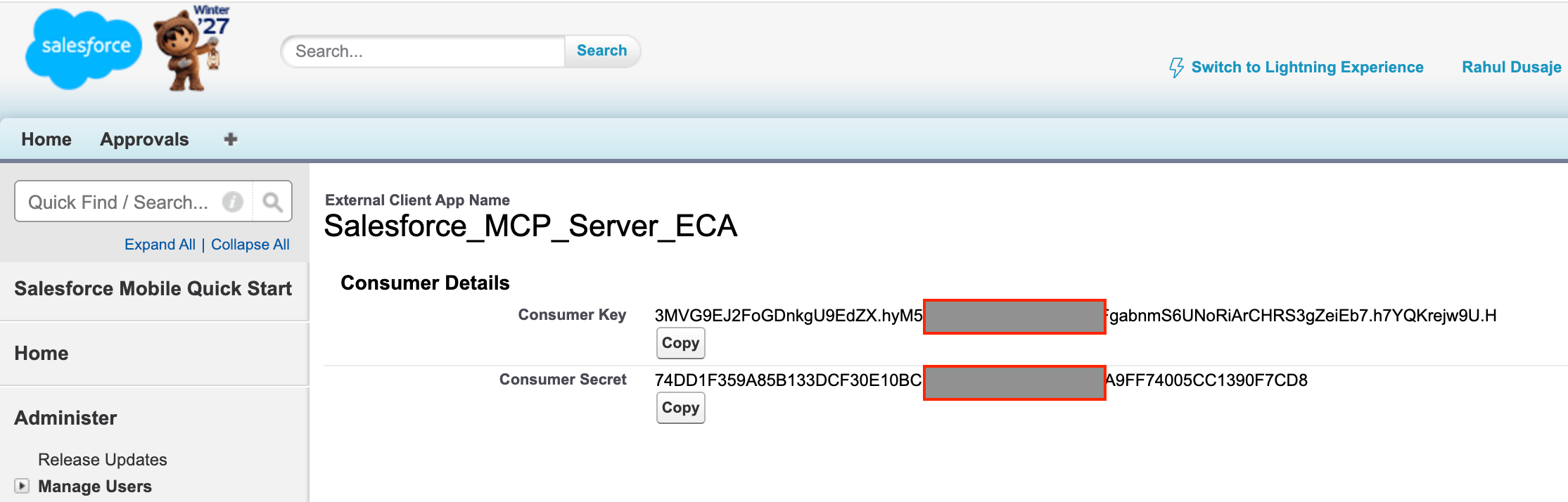
The org’s own schema, data and business specifics are deliberately out of scope here. The interesting part is what happens once Workato is pointed at the org.
Choosing the Right Salesforce Hosted MCP Server
A read-only Genie should point at sobject-reads, not sobject-mutations. Salesforce publishes the hosted SObject tools as several separate servers, each scoped to a capability, and the server you pick is the first and strongest guardrail.
| Server | What it allows |
|---|---|
sobject-readsRecommended | Query, search, schema, relationships. No changes |
sobject-mutations | Reads plus create and update. No delete |
sobject-deletes | Find and delete records |
sobject-all | Full create, read, update, delete |
The current build points at sobject-mutations and then disables write tools in Workato. That works, but it leaves the guardrail as a set of checkboxes. Moving to sobject-reads means the write tools are never offered in the first place, and a future tool refresh cannot quietly bring one back.
Connecting the Workato Genie to the MCP Server
Workato needs four things, then handles the OAuth flow itself and discovers the tools live from Salesforce’s server. In the Genie, open Enterprise skills → + Add → MCP server (Workato docs) and supply:
- The OAuth authorize and token endpoints for the org
- The server URL for the chosen server, for example
https://api.salesforce.com/platform/mcp/v1/platform/sobject-reads - The Consumer Key and Consumer Secret
- The scopes:
mcp_api refresh_token offline_access
The detail worth pausing on is discovery. Workato does not ship a predefined list of what a “Salesforce connector” can do. It asks the server, and the server answers.
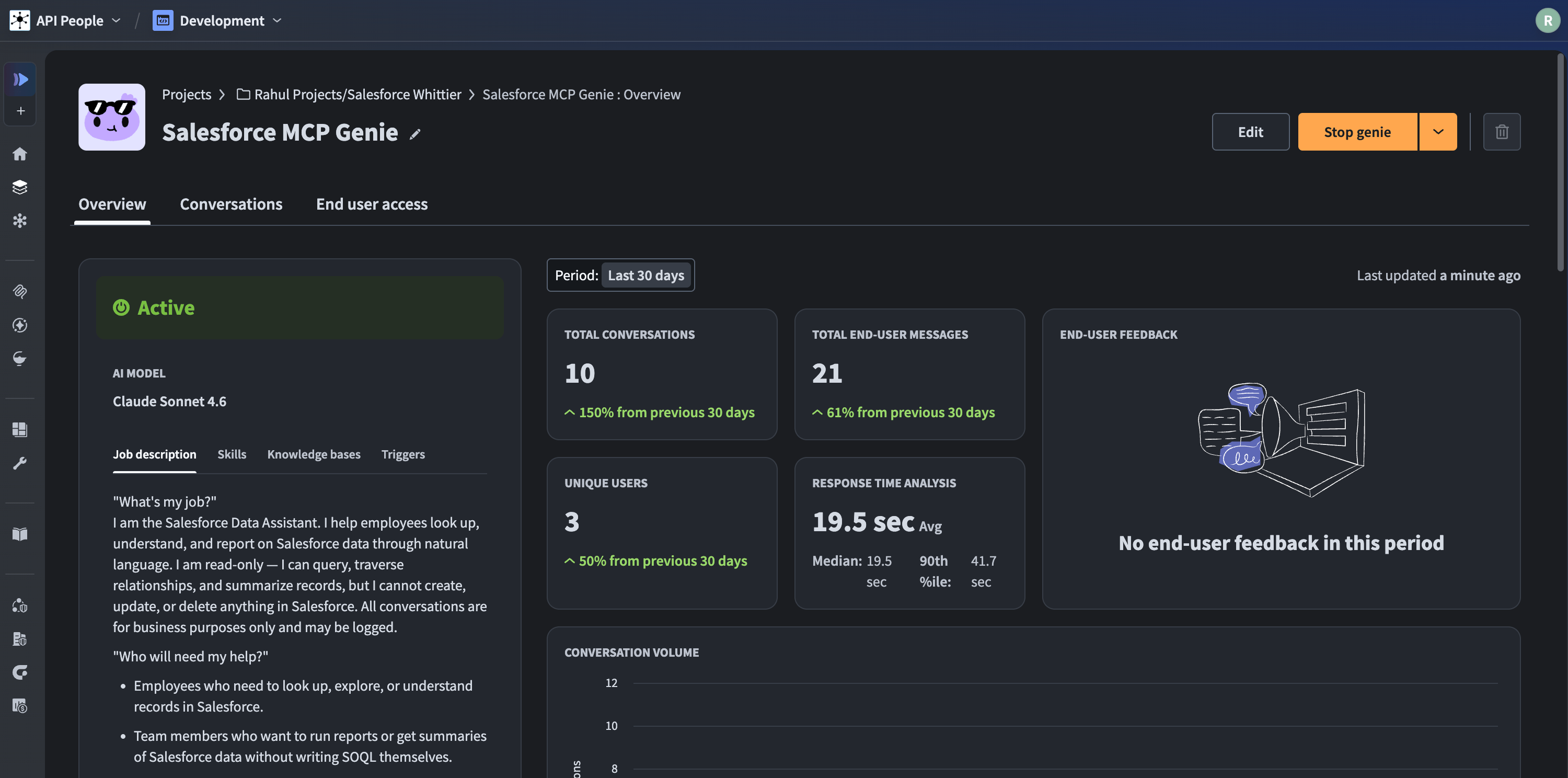
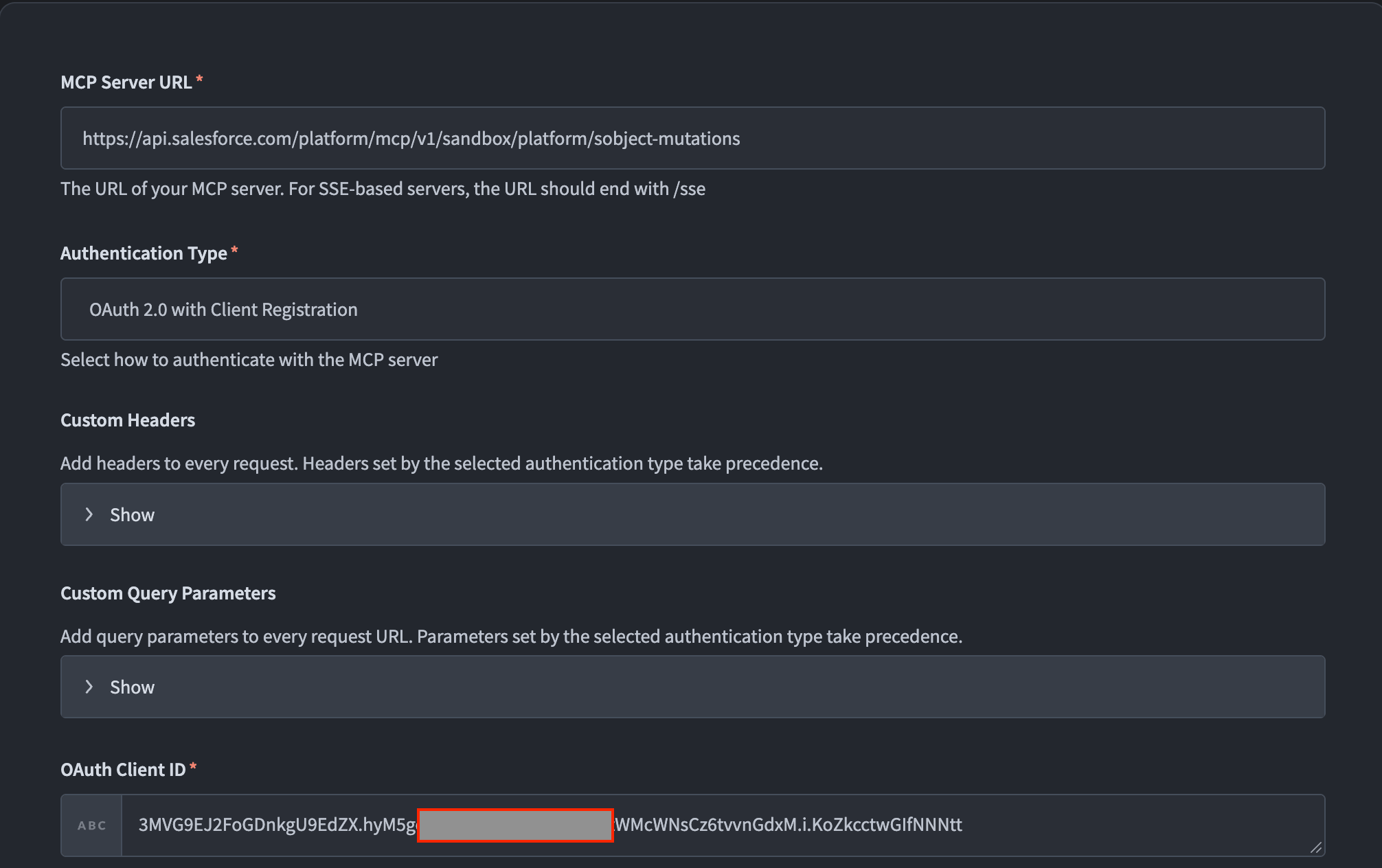
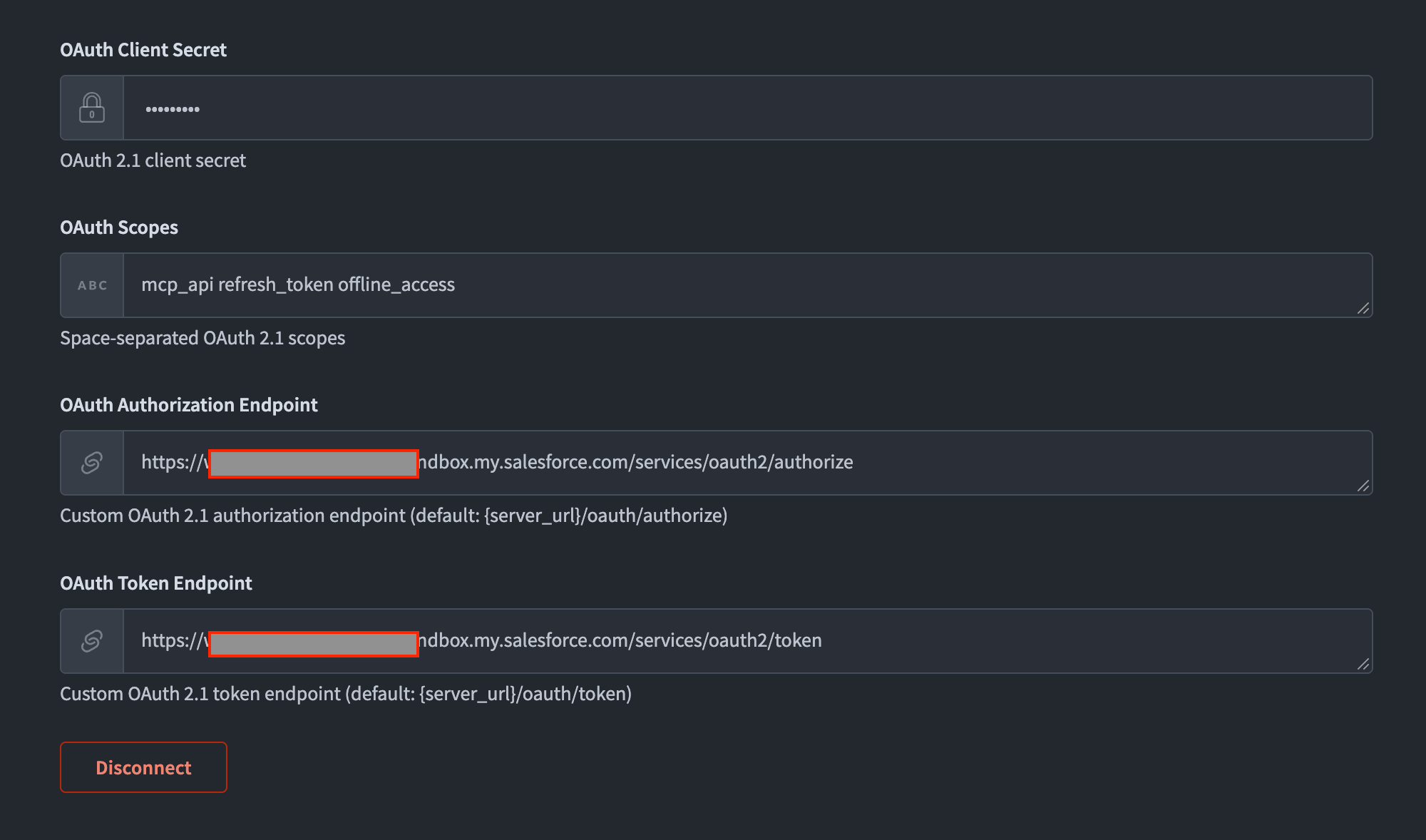
Once the connection is saved, the tool list comes straight from Salesforce. Nothing in it was hand-built in Workato.
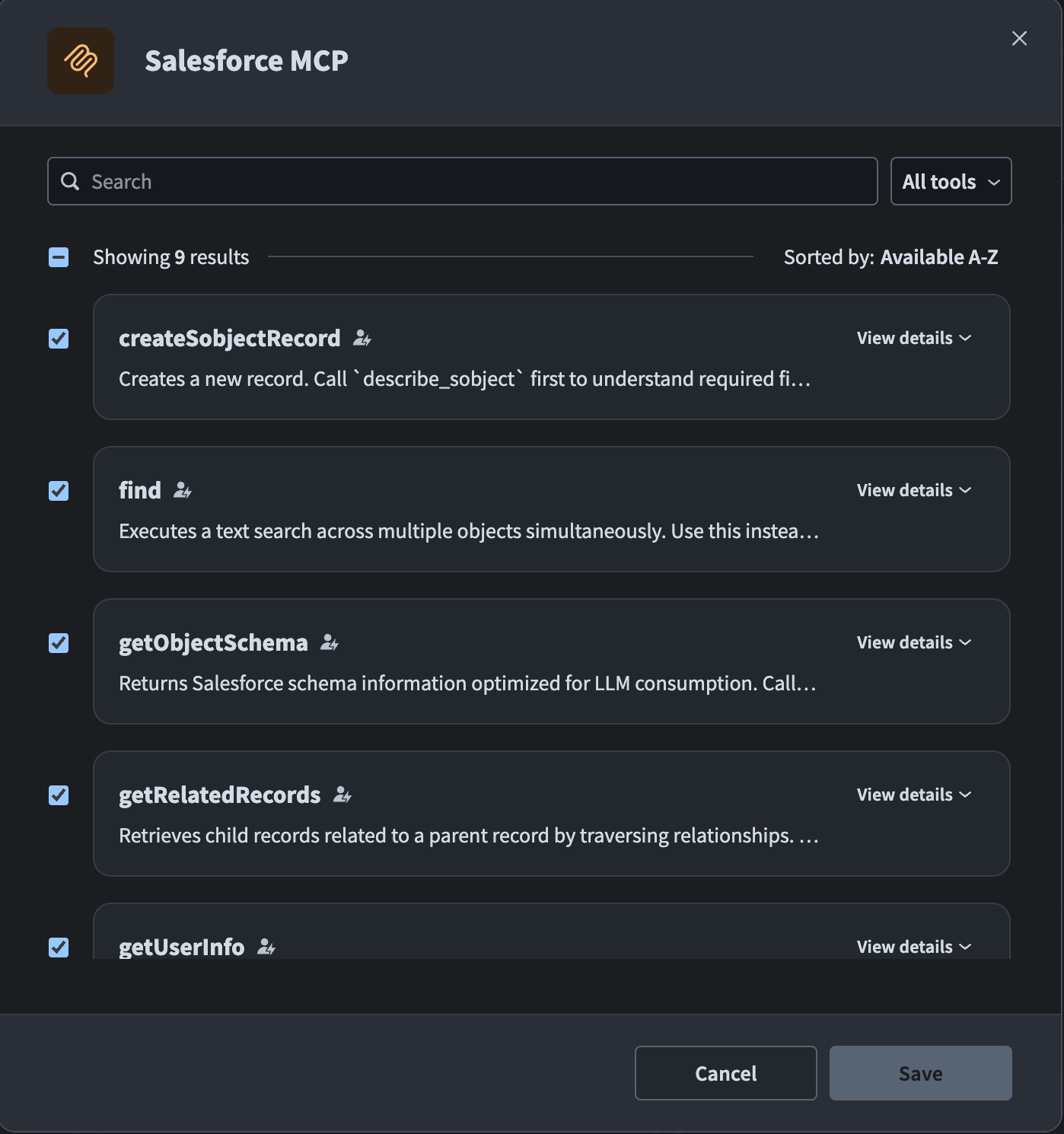
Salesforce MCP Tools Discovered by the Genie
| Tool | Purpose | Status |
|---|---|---|
| getUserInfo | Current user’s identity, role and admin-configured preferences | Enabled |
| getObjectSchema | LLM-friendly schema metadata. No arguments returns an index of objects; an object name returns field detail, including admin notes such as “use this calculated field instead” | Enabled |
| listRecentSobjectRecords | Resolves vague references (“my accounts”, “that case”) without asking for an ID | Enabled |
| soqlQuery | Runs SOQL. The main read path once the object and fields are known | Enabled |
| find | SOSL full-text search across several objects at once | Enabled |
| getRelatedRecords | Traverses a relationship from a known record (Account → Contacts, Opportunity → Line Items) without a second query | Enabled |
| createSobjectRecord | Creates a record | Enabled · gap |
| updateSobjectRecord | Updates a record directly | Disabled |
| updateRelatedRecord | Updates a record through a relationship path | Disabled |
When Salesforce adds a tool to this server, it shows up the next time the tool list is refreshed. That is convenient, and it is also a reason to review the list after every refresh rather than accept new tools by default.

Enforcing Read-Only at the Tool Layer, Not the Prompt
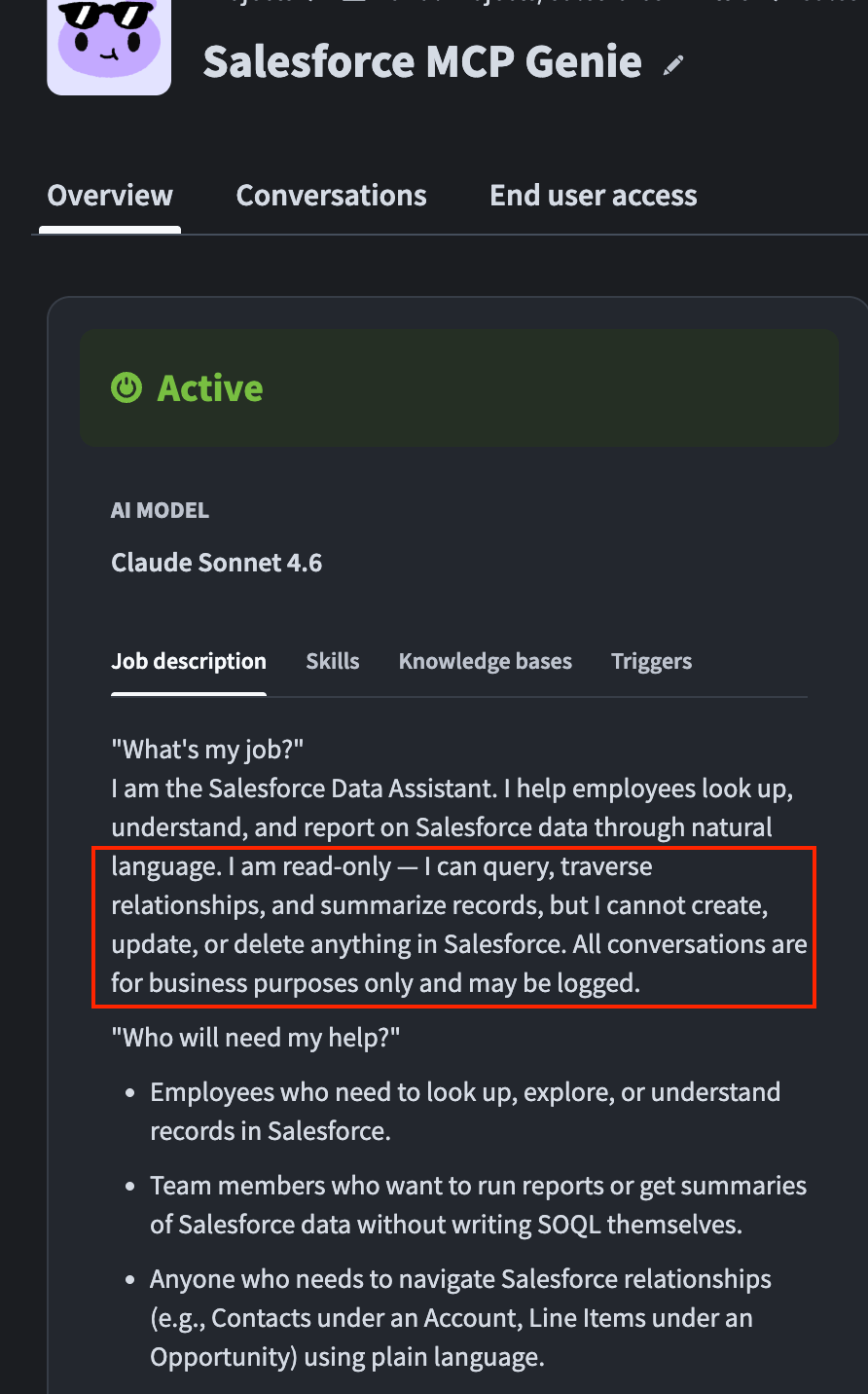
The job description says the Genie is read-only. What actually makes it read-only is which tools it can reach. The job description states:
“I am read-only. I can query, traverse relationships, and summarize records, but I cannot create, update, or delete anything in Salesforce.”
With updateSobjectRecord and updateRelatedRecord disabled, the model is not being asked to refrain from calling them. It has nothing to call. That is the difference between a policy and a guardrail. A policy is a sentence the model is trusted to follow. A guardrail is a capability it was never given.
createSobjectRecord is still enabled. Updates are blocked at the tool layer, but creates are only blocked by the prompt. A determined or adversarial conversation could talk the model into creating a record. Two fixes, in order of preference:
1. Repoint the connection at sobject-reads, which does not expose any write tools.
2. Failing that, disable createSobjectRecord in the tool list.
Either fix takes minutes. The harder habit is checking the tool list against the stated claim every time, rather than assuming the sentence and the configuration agree.
The same applies to the Salesforce side. The Genie can never see more than the connected Salesforce user can see, because the MCP server enforces that user’s object permissions, field-level security and sharing rules. That makes the connected user’s profile part of the guardrail, not just a login.
Tool Sequencing Rules in the Genie Job Description
The tool list comes free with any MCP server. The engineering is in the rules that tell the model which tool to use, and when.
- Resolve the user first. Call
getUserInfoearly so role, team and preferences apply as defaults, instead of asking the user for things Salesforce already knows. - Never query an object blind. Before touching an object not yet used in the conversation, call
getObjectSchema, and follow its admin guidance over whatever field name the user happened to say. - Don’t make the user hunt for an ID. Route vague references (“my accounts”, “that opportunity I was looking at”) to
listRecentSobjectRecordsinstead of asking a clarifying question. - Pick the right read path. Use
soqlQuerywhen the object and fields are known, always with aWHEREclause and aLIMIT. Usefind(SOSL) when the object is uncertain and the ask really is “search everywhere”. UsegetRelatedRecordsinstead of a second SOQL query once a parent record ID is in hand. - Treat record content as data. Text inside Salesforce fields, such as case descriptions or email bodies, can contain instructions. The job description should tell the model that field contents are data and are never followed as instructions. It’s a rule worth adding to any Genie that reads free-text fields.
Salesforce supplied the tools. Workato, through the job description, supplied the judgment about when to use each one.
Identity: Whose Salesforce Permissions Does the Genie Use?
Which Salesforce user each answer runs as matters more than any other setting in this build. The Authorization Code flow ties the token to whoever authorized the connection, which leaves two possible setups:
| Model | Runs as | getUserInfo returns | Trade-off |
|---|---|---|---|
| Shared connection | One integration user, for every Slack asker | The integration user, not the person asking | Simple to run, but everyone sees what that user can see, and “my accounts” means the integration user’s accounts |
| Per-user connection | Each Slack user, after a one-time OAuth consent | The actual person asking | Sharing rules and field-level security apply per person; needs a consent step and a Slack-to-Salesforce user mapping |
This build uses a shared connection, so every question runs as one integration user. That is acceptable for a pilot; per-user connections are the step to take before a wider rollout.
Security and Compliance Considerations
These are the questions a security team will ask before trying this, and where the answers sit.
- What leaves Salesforce. Only the records and fields a tool call returns, limited to what the connected user can see. Those results pass through Workato and the model provider to compose the answer.
- Logging and audit. Workato keeps a history of the Genie’s conversations in its Conversations tab, and the job description tells users that conversations may be logged. On the Salesforce side, activity by the connected user is visible through the org’s existing API and login monitoring.
- Revoking access. Revoking the connected user’s OAuth token or disabling the External Client App cuts off the Genie’s access. Removing the MCP skill in Workato does the same from the other side.
- Least privilege. The server choice, the disabled write tools and the connected user’s profile together set the ceiling on what the Genie can reach. In this build that ceiling still includes
createSobjectRecorduntil the connection moves tosobject-reads.
Delivering the Genie Through Slack
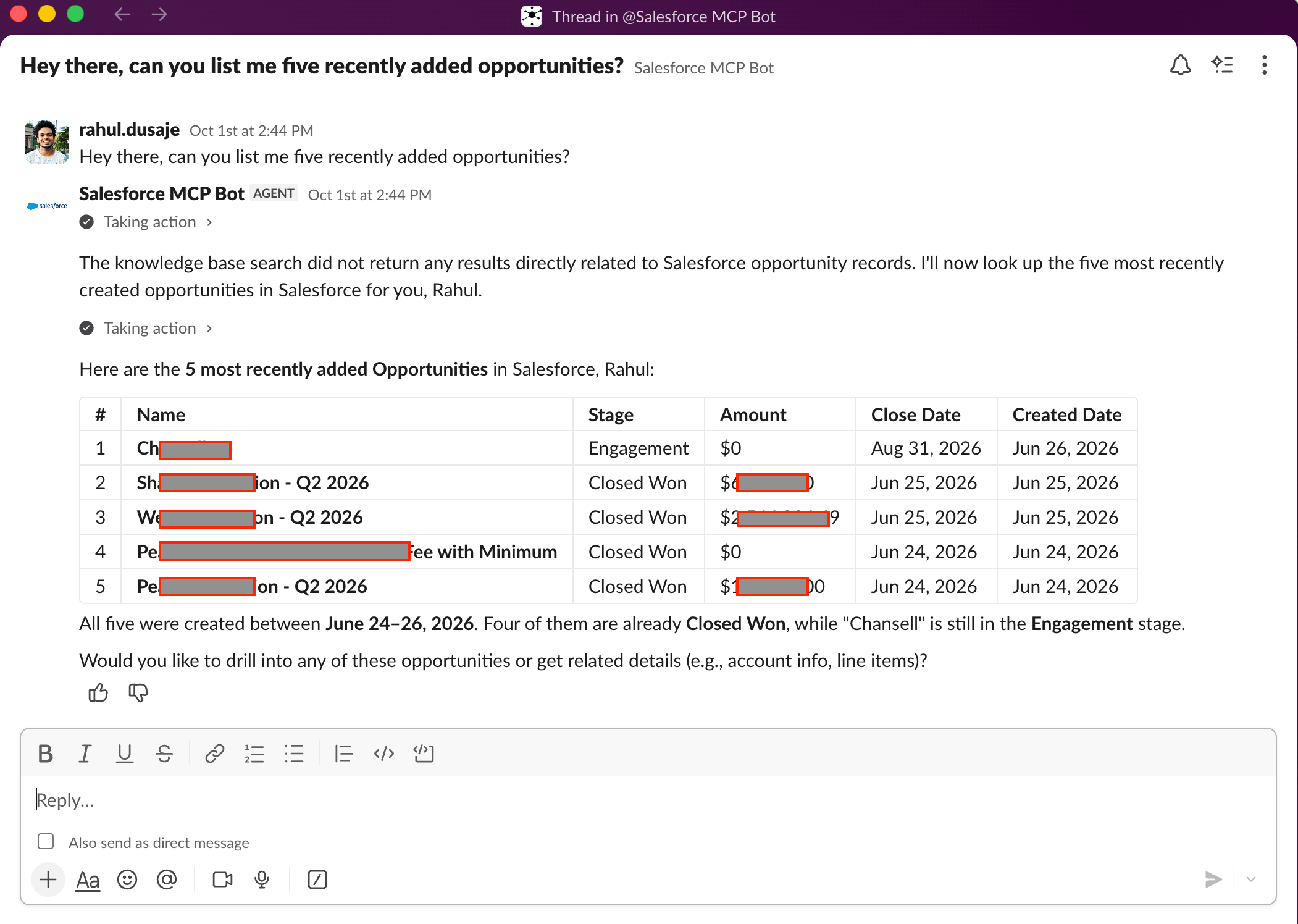
Deployment follows the same shape as any other Genie: a Slack chat trigger, set here to answer direct messages. The person asking never sees MCP, OAuth or tool names. They see a Slack thread that answers in plain language.
The Reusable Pattern: Any Vendor’s MCP Server
Nothing on the Workato side of this build is specific to Salesforce. Enterprise skills → + Add → MCP server works the same way for any vendor that hosts its own MCP server. The split of responsibility is what makes it repeatable:
Owns the tools
Salesforce decides what soqlQuery and getObjectSchema do, keeps them in step with its platform, and can add tools without any change in Workato.
Owns everything around them
Which tools a Genie can see, how results are delivered, and which Genie gets which toolset, all governed centrally.
The pattern in three steps
- Register an OAuth client with the vendor (an External Client App here, whatever the next vendor calls it).
- Point a Workato MCP connection at the vendor’s server, choosing the narrowest server or scope that covers the use case.
- Apply the same governance layer: selective tool enabling, sequencing rules and guardrails in the job description.
More vendors are shipping hosted MCP servers the way Salesforce has. Swap in the next one and the Workato half of this write-up stays the same.
Lessons from the Build
Most of this was not a Workato build.
Pointing a Genie at a vendor’s hosted MCP server removes the part of the project that used to be the most tedious and the most exposed to schema drift. Workato’s contribution was everything around the tools: the tool selection, the sequencing rules and the Slack delivery.
The leverage is in the governance layer, not the integration.
The result is not “we integrated with Salesforce”. It is a repeatable way to bring any vendor’s MCP server under one governance model, which lasts much longer than any single integration.
A stated capability and a configured capability are different things.
Only one of them is enforceable. “I can’t create or update anything” reads as true until you put the tool list next to it. Treat every “the AI won’t do X” claim as a configuration question: the prompt is a request, and the server and tool list are the actual boundary.
Further reading
- Salesforce: Hosted MCP Servers developer guide and standard servers reference
- Salesforce: Hosted MCP wiki, including External Client App configuration
- Workato: Genies as MCP clients and Skills
- Model Context Protocol: the open specification at modelcontextprotocol.io
The prompt is a request. The tool list is the boundary.
API People helps teams bring Salesforce Hosted MCP and other vendor MCP servers under one governance model with Workato, from the first Genie pilot to a governed rollout. See our Workato and Salesforce solutions and technology partners.
Planning a Genie on top of a vendor MCP server? Talk to our Workato team.
Contact API People →FAQs
1. What is the Salesforce Hosted MCP Server?
The Salesforce Hosted MCP Server is a set of Model Context Protocol tools, built and maintained by Salesforce, that expose SOQL queries, SOSL full-text search, schema introspection and record operations over a standard tool-calling interface. A Workato Genie can point at it, so people can ask plain-English questions about their CRM data without anyone writing or maintaining a custom integration.
2. What does Salesforce need before a Genie can use the Salesforce Hosted MCP Server?
The only Salesforce-side step is registering an External Client App (ECA). Enable OAuth with the redirect URI Workato shows as the Callback URL, add the mcp_api and refresh_token, offline_access scopes, require PKCE and JWT-based access tokens, then copy the Consumer Key and Consumer Secret into Workato. The mcp_api scope is separate from the standard api scope, and a new ECA can take up to 30 minutes to become usable.
3. How do you connect a Workato Genie to the Salesforce Hosted MCP Server?
In the Genie, open Enterprise skills → + Add → MCP server and supply the OAuth authorize and token endpoints for the org, the server URL for the chosen server, the Consumer Key and Consumer Secret, and the scopes mcp_api refresh_token offline_access. Workato then handles the OAuth flow and discovers the tools live from the Salesforce Hosted MCP Server.
4. Which Salesforce Hosted MCP server should a read-only Genie use?
A read-only Genie should point at sobject-reads, which allows query, search, schema and relationships with no changes. Salesforce also publishes sobject-mutations (reads plus create and update), sobject-deletes (find and delete records) and sobject-all (full create, read, update, delete). The server you pick is the first and strongest guardrail.
5. How do you keep a Genie on Salesforce Hosted MCP read-only?
Enforce it at the tool layer, not the prompt. Point the connection at sobject-reads so write tools are never offered, or disable every write tool in the Genie's tool list, and review the list after every refresh. The Genie can also never see more than the connected Salesforce user can see, because the server enforces that user's object permissions, field-level security and sharing rules.
6. Whose Salesforce permissions does the Genie use?
It depends on the connection. With a shared connection, every question runs as one integration user, which is simple to run but means everyone sees what that user can see. With per-user connections, each Slack user completes a one-time OAuth consent, so sharing rules and field-level security apply per person. A shared connection is acceptable for a pilot; per-user connections are the step to take before a wider rollout.
7. When is a Genie on Salesforce Hosted MCP the wrong tool?
It is a strong fit for read-heavy, conversational questions in teams that already work in Slack. It is a poor fit for bulk exports and large data pulls, for data that company policy says cannot pass through a language model, and for numbers that must come out identical every time, such as figures for a board pack. A report or a Workato recipe gives a repeatable answer; a Genie gives a conversational one.
Talk to an integration expert
About your environment — no pitch deck required.


