
 Workato
 Azure
 MuleSoft
 Salesforce
 AWS


This is the second in a four-part series on what we built inside our own Workato workspace. Part 1 introduced the Support Triage Assistant — the client-facing Genie that answers support questions in Slack. This article opens the hood on what’s actually running behind it.
In Part 1, we mentioned something in passing: behind that one client-facing assistant, there’s actually a small team of specialist Genies working together. That wasn’t a throwaway line — it’s the part of this build that took the most care to get right, and the part that separates a genuinely useful AI assistant from a chatbot that happens to have a few tools bolted on.
It’s worth being specific about the difference, because from the outside, both can look identical in a demo.
01 - A tool list isn’t a team
The easy way to build this would have been one Genie with every Skill attached to it — look up an account, search the knowledge base, open a ticket, all sitting in a single flat list for one assistant to reach into as it sees fit. That approach works fine in a demo with two or three Skills. It gets messy fast in a real support operation, where the Zendesk logic, the Salesforce logic, and the Confluence logic each have their own edge cases, their own failure modes, and their own reasons to change independently of one another.
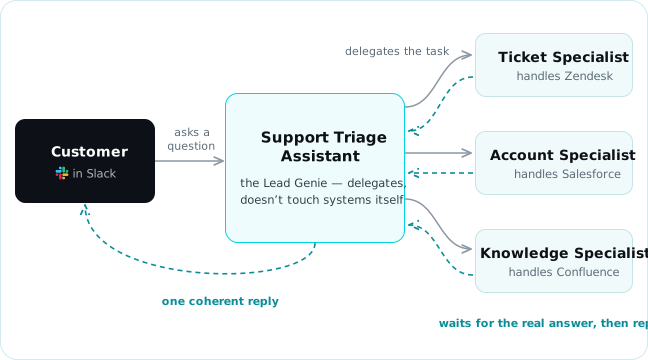
So instead, we built it as a small hierarchy. One Lead Genie — the Support Triage Assistant — is the only thing the customer ever talks to. It doesn’t hold any of the system-specific Skills itself. Its job is to understand what’s being asked and decide who on the team should handle it: a Ticket Specialist Genie scoped entirely to Zendesk, an Account Specialist Genie scoped entirely to Salesforce, and a Knowledge Specialist Genie scoped entirely to Confluence.
Each specialist knows one system well. The Lead Genie knows how to run the room.
02 - How the handoff works in Workato multi-agent orchestration
This only counts as real orchestration if the handoff is genuine — if the Lead Genie is actually waiting on a real answer from a real specialist, not just narrating a decision it already made. In this build, when the Lead Genie decides a request belongs to a specialist, it hands that request off and pauses. The specialist Genie picks it up, does its own reasoning, calls its own Skills against its own system, and sends back an answer. Only then does the Lead Genie resume and reply to the customer — often stitching together more than one specialist’s answer into a single, coherent reply.
That distinction — delegating and waiting for a real answer, versus one assistant quietly doing all the work itself and just narrating it that way — is exactly what we set out to verify before calling this “orchestration” instead of just “a Genie with a lot of tools.”
03 - Proof in action
We didn’t want to take our own word for it, so we built a short test suite of six scenarios specifically designed to catch the difference — including requests that couldn’t be answered by a single specialist alone.
One question, two specialists, one reply.
We tested it with a single message that genuinely required two specialists to cooperate: “What’s the support tier for Meridian Health Group, and can you check the status of ticket #11 while you’re at it?” The Lead Genie holds neither Skill itself — account lookups belong to the Account Specialist, ticket lookups to the Ticket Specialist — so the only way to answer both halves correctly is to actually hand off to each one and wait for a real result back. Slack’s own “Taking action” indicator doesn’t name which specialist is running behind it, but the reply makes the delegation obvious: both the Salesforce account data and the live Zendesk ticket status came back correct, woven into a single response — including a callback to the priority mismatch it had flagged earlier in the same thread.

The honest part: our first pass got it wrong.
In an earlier version of this build, we handed the Lead Genie direct access to the specialists’ own Skills instead of clean delegation instructions. It technically worked — but it meant the Lead Genie was quietly reaching into Zendesk and Salesforce itself, skipping its own team entirely. Nothing about that was visible from the customer’s side; a demo would have looked identical. We only caught it because we went looking for it. The fix wasn’t a smarter model — it was rewriting the Lead Genie’s instructions to make delegation the only path, and testing until we could prove each specialist was actually being called.
That kind of correction is exactly the work a client doesn’t see, and exactly why “someone configured this correctly” is worth paying for.
None of this — the Lead Genie, the specialists, the Slack conversation itself — is reachable only from inside Slack. The same Support Triage Assistant can be exposed as a set of tools any external AI system can call directly. That’s the subject of the next article in this series.
This isn’t a diagram of how Workato multi-agent orchestration could theoretically work. It’s a Lead Genie that we watched delegate, wait, and reply correctly — and a mistake we caught and fixed along the way, because we tested for it.
Previously in this series Part 1: Meet the Workato Genie, how we built — and actually tested — a real AI support assistant. Read Part 1 →
Next in this series Part 3: Enterprise MCP, how the same assistant becomes a set of tools any external AI client can call directly. Browse all articles →
Want a Workato Genie working on your real systems, not a demo? Start the conversation.
Reach out →FAQs
1. Why not just give one Workato Genie all the Skills?
It can work for a small demo, but it doesn’t hold up in production — which is where Workato multi-agent orchestration earns its keep. Separating Skills by specialist keeps each one’s logic simple to reason about, easier to fix without breaking something unrelated, and clearer to audit when something goes wrong. It’s the same reason a real support org has specialized roles instead of one person trying to know every system.
2. How do you know Workato multi-agent orchestration is real delegation, not just for show?
By designing tests a single Genie couldn’t pass on its own — like a question that genuinely needs two specialists’ answers combined — and confirming each specialist was actually invoked, not just narrated.
3. Does Workato multi-agent orchestration slow the assistant down?
There’s a small amount of added latency for the hand-off itself, but it’s traded for accuracy and maintainability. In our testing of Workato multi-agent orchestration, the delay was well within what a person would consider a normal, responsive chat reply.
4. Can Workato multi-agent orchestration scale to more than three specialists?
Yes — the pattern is the same regardless of how many specialists sit behind the Lead Genie. The real design work is in scoping each specialist narrowly and giving the Lead Genie clear, unambiguous instructions on who owns what.
Read it offline — get the full PDF
Fill in two fields and the download starts right here.
- Every figure and diagram at full resolution
- All sources, linked and cited
Talk to an integration expert
About your environment — no pitch deck required.

Marvin Fontanilla
Senior Integration Engineer with 13+ years of software engineering and enterprise integration experience, specializing in MuleSoft, API architecture, cloud integration, and integration modernization. Experienced in building API and serverless solutions using FastAPI, Python, and AWS services including Lambda, S3, SQS, SNS, DynamoDB, IAM, and CloudWatch, with Infrastructure as Code exposure using Terraform. Recently expanded into AI integration through hands-on experience with MuleSoft Agent Fabric concepts, including Agent Network, Model Context Protocol (MCP), Agent-to-Agent (A2A) communication, AI/agent governance, and LLM integration. Experienced with Anthropic Claude and OpenAI in development and POC workflows. Brings a strong enterprise integration foundation for connecting AI agents and LLMs with APIs, business systems, and cloud services. Targeting AI Integration Engineer / Agentic AI Integration roles while continuing to leverage deep MuleSoft and enterprise API expertise.


